Just a moment, logging you in...
https://store-images.s-microsoft.com/image/apps.29688.7943303f-d6f9-42fb-b672-f0268609e507.0f3d59af-30fc-448a-920a-f5b9d1779540.fa2906a0-e6ce-45c4-9628-676fc91bcac1
Zoho CRM and SharePoint Online Integration
IT Partner LLC
Streamline sales by connecting Zoho CRM with SharePoint, ensuring teams always use current, secure collateral with automated version control.
Streamline sales by connecting Zoho CRM with SharePoint, ensuring teams always use current, secure collateral with automated version control.
🌐 Zoho CRM + SharePoint Online Integration
Your sales collateral. Always current. Always secure.
Are sales teams using outdated assets because the latest versions are buried in SharePoint? Do deal managers waste time manually attaching files to Zoho CRM records?
With IT Partner's Zoho CRM + SharePoint Integration, you can:
- Link SharePoint documents directly to Zoho CRM Deals, Accounts, and Contacts
- Ensure every deal uses approved, up-to-date sales collateral
- Automate version control and access management for sales assets
🔗 What This Integration Does
We connect SharePoint Online with Zoho CRM to enable:
- Secure linking of SharePoint documents to Zoho CRM records
- Automatic metadata sync between SharePoint and Zoho CRM
- Real-time alerts when linked sales assets are updated
- Full access control using SharePoint permissions and Zoho CRM user roles

💡 Why It Matters
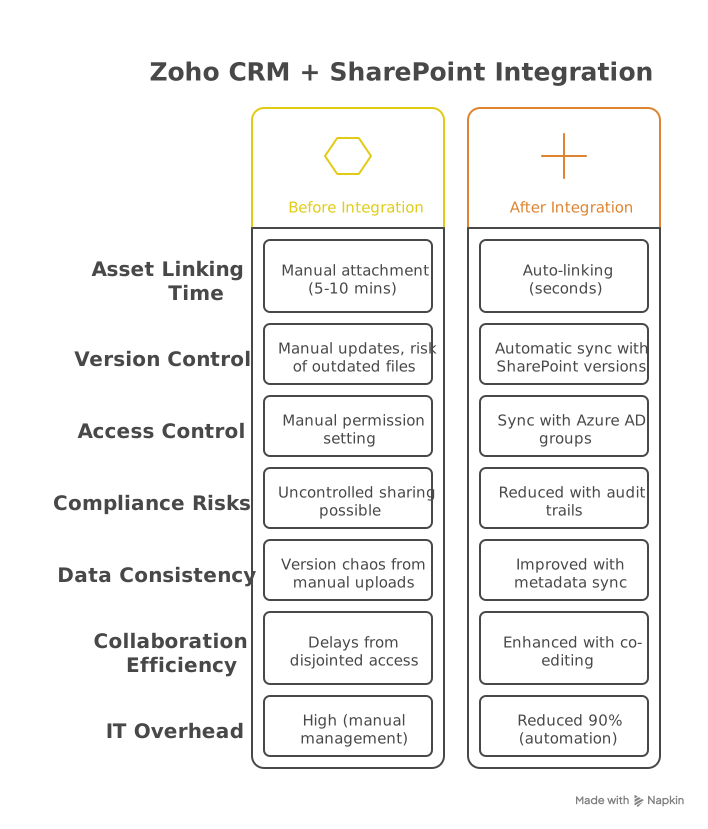
Without integration:
- Sales teams struggle with version control across platforms
- Manual document uploads create version chaos
- Compliance risks from uncontrolled asset sharing
With integration:
- ✅ Always link to current SharePoint files from Zoho CRM
- ✅ Maintain version history and approvals in SharePoint
- ✅ Control access with Azure AD + Zoho CRM permissions
- ✅ Ensure data consistency across sales materials
🚀 Key Benefits
- Single source of truth - Access latest approved assets
- Data consistency - Ensure all deals use current materials
- Automated governance - Sync asset status to Zoho CRM
- Secure collaboration - Co-edit while maintaining audit trails
- Time savings - Eliminate manual file uploads
⚙️ How It Works
- Link sales assets from SharePoint to Zoho CRM using secure URLs
- Sync metadata like approval status and expiration dates
- Set up alerts when critical sales assets are modified
- Control access with combined permissions
Technical Implementation:
- SharePoint REST API for document management
- Zoho CRM REST API for integration and workflows
- Azure Event Grid for change notifications
- Microsoft Graph API for authentication
Technical Considerations:
- Files remain stored in SharePoint
- Requires Zoho CRM Professional or higher
- Custom metadata sync requires configuration
License Requirements:
- Zoho CRM: Professional Edition or higher
- Microsoft: SharePoint Plan 2 for advanced features
🎯 Who's This For?
- Sales teams managing complex deals and assets
- Sales managers needing collateral control
- Organizations with compliance requirements
- Agencies managing client sales materials
- Sales operations requiring automated management
🏆 Why Choose IT Partner LLC
- Microsoft expertise with deep SharePoint experience
- Zoho CRM Certified Integration Specialists
- Sales technology experts understanding workflows
- Security and compliance focus for regulated industries
- End-to-end service from design to support

💬 What's Next?
Let's discuss streamlining your sales asset management and deal workflows.
Transform your sales operations with seamless Zoho CRM and SharePoint integration.
At a glance
https://store-images.s-microsoft.com/image/apps.28883.7943303f-d6f9-42fb-b672-f0268609e507.0f3d59af-30fc-448a-920a-f5b9d1779540.5d7f5021-aa1d-4b9c-96da-27db7b97797a
Other consulting services from IT Partner LLC
Copilot for Microsoft 365 Optimization Assessment: 1-Hour Consulting ServiceIT Partner LLCEmpower digital transformation journey with Microsoft Copilot Optimization Assessment to elevate productivity, streamline workflows, and maximize AI utilization for impactful business growth.
+3
Applicable to: Adoption & Change Management
 Knowledge & Insights
 Workplace Analytics
Adoption & Change ManagementKnowledge & InsightsWorkplace AnalyticsNaN out of 5
Chief Information Officer (CIO) as a Service: 1-Day Consulting ServiceIT Partner LLCProvide organizations with strategic technology leadership and guidance, ensuring effective utilization of IT resources and alignment with business objectives.
+3
Applicable to:Adoption & Change ManagementKnowledge & InsightsWorkplace Analytics
Adoption & Change ManagementKnowledge & InsightsWorkplace AnalyticsNaN out of 5
Full Cutover Google Workspace to Office 365 migration: 7-Days Professional ServiceIT Partner LLCMigrate G Suite (Google Apps) to Microsoft 365, transferring mailboxes, calendars, tasks, contacts, files, and documents seamlessly to Exchange Online and OneDrive.
+3
Applicable to:Adoption & Change Management Identity & Access Management
 Mobile Device Management
Adoption & Change ManagementIdentity & Access ManagementMobile Device ManagementNaN out of 5
Microsoft Teams Phone System - Initial Setup: 2-Wk Professional ServiceIT Partner LLCWe will help you deploy, configure, and set up the Cloud Phone System & Enterprise Voice in Microsoft 365.
+3
Applicable to:Adoption & Change Management Calling for Microsoft Teams
 Device Deployment & Management
Adoption & Change ManagementCalling for Microsoft TeamsDevice Deployment & ManagementNaN out of 5
Office 365 Administrator On DemandIT Partner LLCAssistance with various admin tasks, such as user creation and Exchange Online rule management in your Microsoft 365 account is available via phone, Skype for Business, or remotely.
+3
Applicable to:Adoption & Change ManagementKnowledge & InsightsWorkplace Analytics
Adoption & Change ManagementKnowledge & InsightsWorkplace AnalyticsNaN out of 5