Just a moment, logging you in...
https://store-images.s-microsoft.com/image/apps.29688.1de04cdd-bf5c-49c6-8975-2cc4c9c5077b.effcbfa4-d17b-41e5-936b-85cd54bb8adc.ef475e8a-d93c-4147-b6b6-52e7d1b30bf4
Salesforce and OneDrive for Business Integration
IT Partner LLC
Automate doc management by linking OneDrive files to Salesforce records securely. Cuts manual uploads, ensures version control, & maintains compliance. Pricing/timeline scoped per project.
Automate doc management by linking OneDrive files to Salesforce records securely. Cuts manual uploads, ensures version control, & maintains compliance. Pricing/timeline scoped per project.
📁 Connect Salesforce with OneDrive for Business
Sync documents and assets seamlessly — eliminate manual uploads and outdated files.
Manually transferring files between OneDrive and Salesforce introduces errors, delays business processes, and risks using unapproved document versions.
With IT Partner's API integration service, you can:
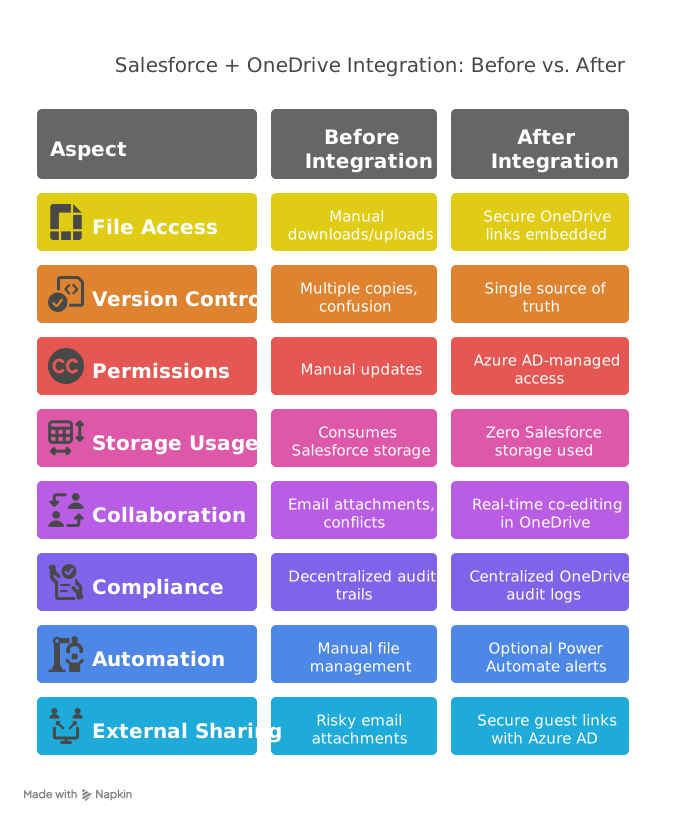
- Embed OneDrive files in Salesforce as secure links (files remain in OneDrive)
- Automate alerts when linked files are updated (Power Automate required)
- Enforce access via Microsoft 365 permissions and security policies
- Maintain full audit trails and version control
🔗 Key Features
- Secure API integration – Files remain in OneDrive; Salesforce displays secure previews using Graph API
- Automatic version control – Always reference the latest OneDrive file version
- Compliance-ready – Azure AD permissions, Microsoft 365 sensitivity labels, and OneDrive audit trails
- REST API-based integration – Modern, scalable connection between platforms
- Automated workflows (optional): - File changes → Notify teams via email/Teams - New documents → Auto-link to Salesforce records - Permission changes → Sync access rights automatically
⚙️ How It Works
- API Connection – Establish secure connection between Salesforce and OneDrive using Microsoft Graph API and Salesforce REST API
- Secure linking – Generate authenticated OneDrive URLs in Salesforce via API integration
- Permission synchronization – Control access via Azure AD security groups and sharing policies
- Configure automated workflows (if licensed): - Power Automate monitors OneDrive changes → Sends real-time notifications - Advanced: API automatically updates Salesforce records when documents change
⚠️ Technical Considerations
- One-way sync – Salesforce embeds links; document edits require OneDrive
- Authentication required – Users must have appropriate Microsoft 365 licenses to access files
- Power Automate – Required for automated alerts (Plan 1/licensed users)
- Supported file types – Common business formats (PDF, DOCX, XLSX, JPEG, PNG)
- API limits – Subject to Microsoft Graph API and Salesforce API rate limits
🎯 Ideal For
- Sales teams managing proposals, contracts, and client documents
- Organizations using Microsoft 365 security and compliance tools
- Companies requiring unified document management across CRM and cloud storage
- Businesses automating document-driven workflows and approvals
- Teams needing real-time document collaboration with CRM integration

🏆 Why IT Partner LLC?
- Experts in Microsoft Graph API and security integration
- Salesforce API specialists – Deep expertise in CRM automation and integration
- End-to-end ownership – From strategic planning to implementation and support
- Performance-focused – Build with scale, speed, and measurable ROI in mind
- 24/7 support – Continuous monitoring, maintenance, and optimization
- Security first – Industry best practices for data protection and authentication

💬 Get Started Today
Ready to transform your document management workflow? Contact us to discuss your integration needs:
Let's build your integrated document management system with purpose and precision.
概要
https://store-images.s-microsoft.com/image/apps.28883.1de04cdd-bf5c-49c6-8975-2cc4c9c5077b.effcbfa4-d17b-41e5-936b-85cd54bb8adc.c33ca7d1-7252-4ba4-a8dc-8bbd3eae3be4
IT Partner LLC が提供するその他のコンサルティング サービス
Copilot for Microsoft 365 Optimization Assessment: 1-Hour Consulting ServiceIT Partner LLCEmpower digital transformation journey with Microsoft Copilot Optimization Assessment to elevate productivity, streamline workflows, and maximize AI utilization for impactful business growth.
+3
Applicable to: Adoption & Change Management
 Knowledge & Insights
 Workplace Analytics
Adoption & Change ManagementKnowledge & InsightsWorkplace AnalyticsNaN out of 5
Full Cutover Google Workspace to Office 365 migration: 7-Days Professional ServiceIT Partner LLCMigrate G Suite (Google Apps) to Microsoft 365, transferring mailboxes, calendars, tasks, contacts, files, and documents seamlessly to Exchange Online and OneDrive.
+3
Applicable to:Adoption & Change Management Identity & Access Management
 Mobile Device Management
Adoption & Change ManagementIdentity & Access ManagementMobile Device ManagementNaN out of 5
Chief Information Officer (CIO) as a Service: 1-Day Consulting ServiceIT Partner LLCProvide organizations with strategic technology leadership and guidance, ensuring effective utilization of IT resources and alignment with business objectives.
+3
Applicable to:Adoption & Change ManagementKnowledge & InsightsWorkplace Analytics
Adoption & Change ManagementKnowledge & InsightsWorkplace AnalyticsNaN out of 5
Microsoft Teams Phone System - Initial Setup: 2-Wk Professional ServiceIT Partner LLCWe will help you deploy, configure, and set up the Cloud Phone System & Enterprise Voice in Microsoft 365.
+3
Applicable to:Adoption & Change Management Calling for Microsoft Teams
 Device Deployment & Management
Adoption & Change ManagementCalling for Microsoft TeamsDevice Deployment & ManagementNaN out of 5
Office 365 Administrator On DemandIT Partner LLCAssistance with various admin tasks, such as user creation and Exchange Online rule management in your Microsoft 365 account is available via phone, Skype for Business, or remotely.
+3
Applicable to:Adoption & Change ManagementKnowledge & InsightsWorkplace Analytics
Adoption & Change ManagementKnowledge & InsightsWorkplace AnalyticsNaN out of 5