Just a moment, logging you in...
https://store-images.s-microsoft.com/image/apps.29688.28a655ad-0e03-43ee-8057-5b132aed4775.223d5f7d-3788-4fd0-9d04-2a24c6fdf668.3dc65fa6-d559-4b50-8e8a-053ad8ff44ab
Salesforce and Microsoft Intune Integration
IT Partner LLC
Secure Salesforce access with Intune. Enforce device compliance, conditional access, and data protection for CRM. Pricing and timeline customized post-scoping.
Secure Salesforce access with Intune. Enforce device compliance, conditional access, and data protection for CRM. Pricing and timeline customized post-scoping.
📱 Secure Salesforce Access with Microsoft Intune
Zero Trust Device Security for Your CRM
Your sales team accesses customer data from multiple devices—office workstations, field tablets, or personal phones.
IT Partner's Salesforce + Intune Integration ensures only compliant, managed devices can access sensitive CRM data.
🔒 What This Integration Does
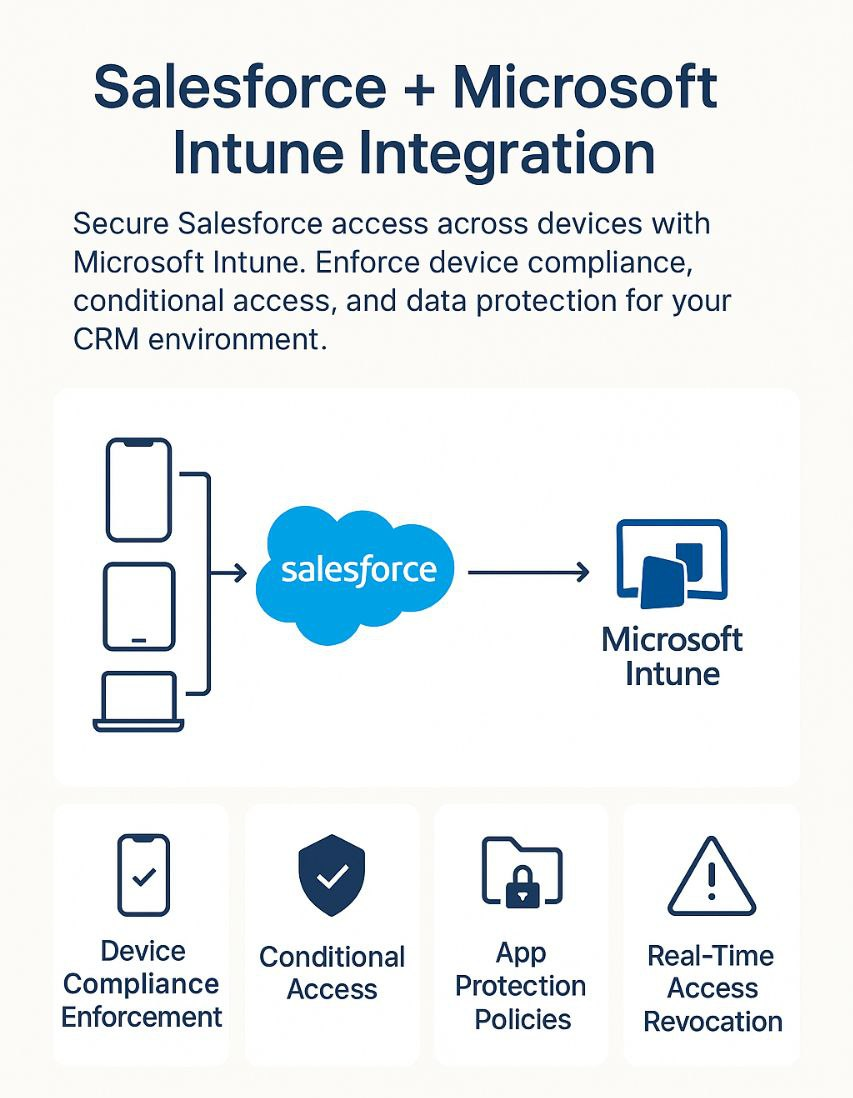
We connect Microsoft Intune with Salesforce to enable:
- 📱 Device compliance enforcement before granting Salesforce access
- 🛡️ Conditional Access via Microsoft Entra ID (location, device risk, user sensitivity)
- 📁 App protection policies for Salesforce mobile app and browser access
- 🚨 Real-time access revocation for non-compliant or compromised devices
- 📊 Unified monitoring of device access patterns in Microsoft Endpoint Manager
💡 Why It Matters
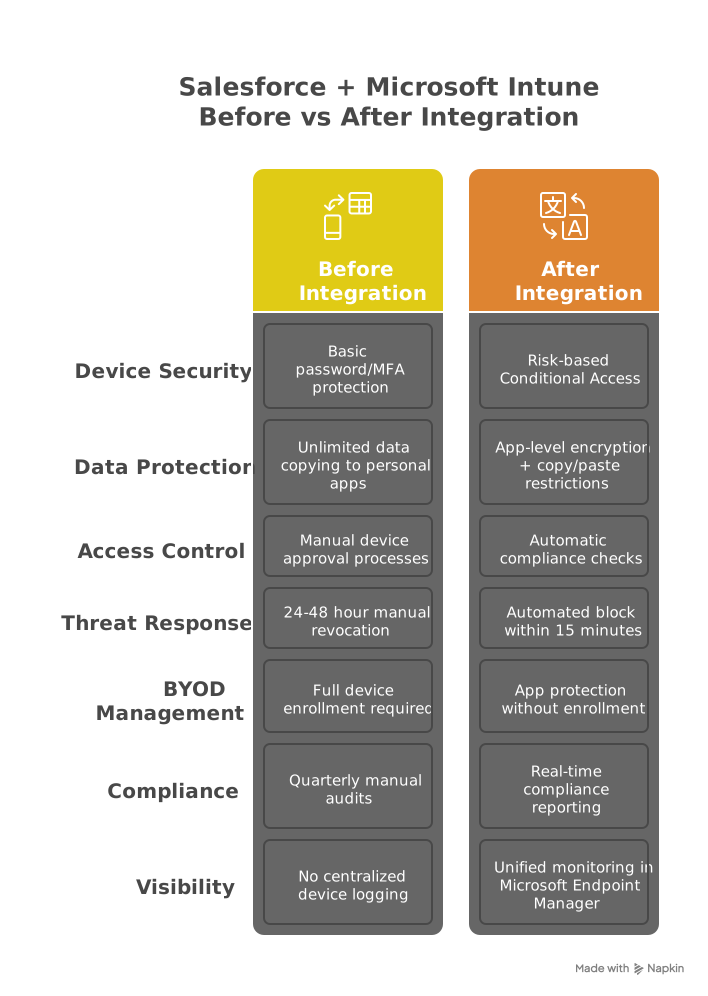
Without Intune:
- ❌ Salesforce accessed from unsecured personal devices
- ❌ No control over data copying to unmanaged apps
- ❌ Lost/stolen devices remain access points
With Intune:
✅ Block access from jailbroken or non-compliant devices
✅ Prevent data leakage via copy/paste restrictions
✅ Wipe corporate data remotely without affecting personal content
🚀 Key Benefits
- Zero Trust access – Block risky Salesforce logins via Entra ID Conditional Access
- Protect CRM data – Intune app policies prevent copy/paste & save-as in Salesforce Mobile
- BYOD security – Protect data without full device enrollment (app-level only)
- Fast response – Block access within 15 min of compliance failure
- Compliance ready – Auto-generate GDPR, HIPAA & financial reports
- Unified visibility – Track Salesforce access via Endpoint Manager
⚙️ How It Works
Entra ID Integration
- Configure Salesforce as enterprise app with SAML SSO
- Set risk-based Conditional Access policies
Intune Policies
- Deploy device compliance rules (OS version, encryption, jailbreak detection)
- Apply app protection policies to Salesforce mobile app
Monitoring
- Track access attempts in Microsoft Defender for Cloud Apps
- Note: Windows/Mac clients require third-party MDM for full control
Technical Requirements:
- Salesforce Enterprise/Unlimited Edition
- Microsoft Intune Plan 1 (or Microsoft 365 E3/E5)
- Microsoft Entra ID P1/P2
⚠️ Limitations
- Browser-based access: Limited to session timeout controls
- Windows/Mac apps: Require third-party MDM for full protection
- Offline data: Encryption requires Salesforce Mobile v23.2+
🎯 Who's This For?
- Sales organizations with field teams using mobile devices
- Companies storing PII in Salesforce (healthcare, financial services)
- IT teams managing BYOD programs

🏆 Why Choose IT Partner LLC
- Microsoft Intune Specialists: 50+ endpoint security deployments
- Salesforce implementation expertise since 2018
- Compliance Ready: Pre-built templates for HIPAA/GLBA

💬 Secure Your Salesforce Mobility Today
Protect CRM access with enterprise-grade device management.
概要
https://store-images.s-microsoft.com/image/apps.28883.28a655ad-0e03-43ee-8057-5b132aed4775.223d5f7d-3788-4fd0-9d04-2a24c6fdf668.57456804-4a62-4541-98d9-eb8e5f44de72
IT Partner LLC が提供するその他のコンサルティング サービス
Copilot for Microsoft 365 Optimization Assessment: 1-Hour Consulting ServiceIT Partner LLCEmpower digital transformation journey with Microsoft Copilot Optimization Assessment to elevate productivity, streamline workflows, and maximize AI utilization for impactful business growth.
+3
Applicable to: Adoption & Change Management
 Knowledge & Insights
 Workplace Analytics
Adoption & Change ManagementKnowledge & InsightsWorkplace AnalyticsNaN out of 5
Full Cutover Google Workspace to Office 365 migration: 7-Days Professional ServiceIT Partner LLCMigrate G Suite (Google Apps) to Microsoft 365, transferring mailboxes, calendars, tasks, contacts, files, and documents seamlessly to Exchange Online and OneDrive.
+3
Applicable to:Adoption & Change Management Identity & Access Management
 Mobile Device Management
Adoption & Change ManagementIdentity & Access ManagementMobile Device ManagementNaN out of 5
Chief Information Officer (CIO) as a Service: 1-Day Consulting ServiceIT Partner LLCProvide organizations with strategic technology leadership and guidance, ensuring effective utilization of IT resources and alignment with business objectives.
+3
Applicable to:Adoption & Change ManagementKnowledge & InsightsWorkplace Analytics
Adoption & Change ManagementKnowledge & InsightsWorkplace AnalyticsNaN out of 5
Microsoft Teams Phone System - Initial Setup: 2-Wk Professional ServiceIT Partner LLCWe will help you deploy, configure, and set up the Cloud Phone System & Enterprise Voice in Microsoft 365.
+3
Applicable to:Adoption & Change Management Calling for Microsoft Teams
 Device Deployment & Management
Adoption & Change ManagementCalling for Microsoft TeamsDevice Deployment & ManagementNaN out of 5
Office 365 Administrator On DemandIT Partner LLCAssistance with various admin tasks, such as user creation and Exchange Online rule management in your Microsoft 365 account is available via phone, Skype for Business, or remotely.
+3
Applicable to:Adoption & Change ManagementKnowledge & InsightsWorkplace Analytics
Adoption & Change ManagementKnowledge & InsightsWorkplace AnalyticsNaN out of 5