Just a moment, logging you in...
https://store-images.s-microsoft.com/image/apps.29688.f61fd138-a317-4a15-aab6-a24ea519b302.cf492e3a-5fad-40f9-b63c-b929d8cd5f3e.ded2be55-a450-41b0-9b34-def11705a9cf
HubSpot and Microsoft Teams Integration
IT Partner LLC
Integrate HubSpot with Microsoft Teams to receive real-time campaign alerts, approve marketing content, and collaborate with embedded CRM data directly in Teams.
Integrate HubSpot with Microsoft Teams to receive real-time campaign alerts, approve marketing content, and collaborate with embedded CRM data directly in Teams.
💬 HubSpot + Microsoft Teams Integration
Accelerate campaigns and streamline marketing approvals — right in Teams.
Switching between HubSpot and Teams delays responses and creates visibility gaps for marketing teams.
With our HubSpot + Microsoft Teams Integration, your team can:
- Get real-time campaign alerts in Teams channels when key metrics change
- Approve marketing content and budgets directly from Teams messages
- Collaborate on campaigns with HubSpot data embedded in Teams chats
🔗 What This Integration Does
We connect Microsoft Teams with HubSpot to enable:
- Automated campaign alerts in Teams channels
- Approval workflows triggered from Teams that update HubSpot records
- Teams tabs with HubSpot data (Campaigns, Contacts, Performance dashboards)
- @mentions in Teams that create HubSpot tasks and follow-ups
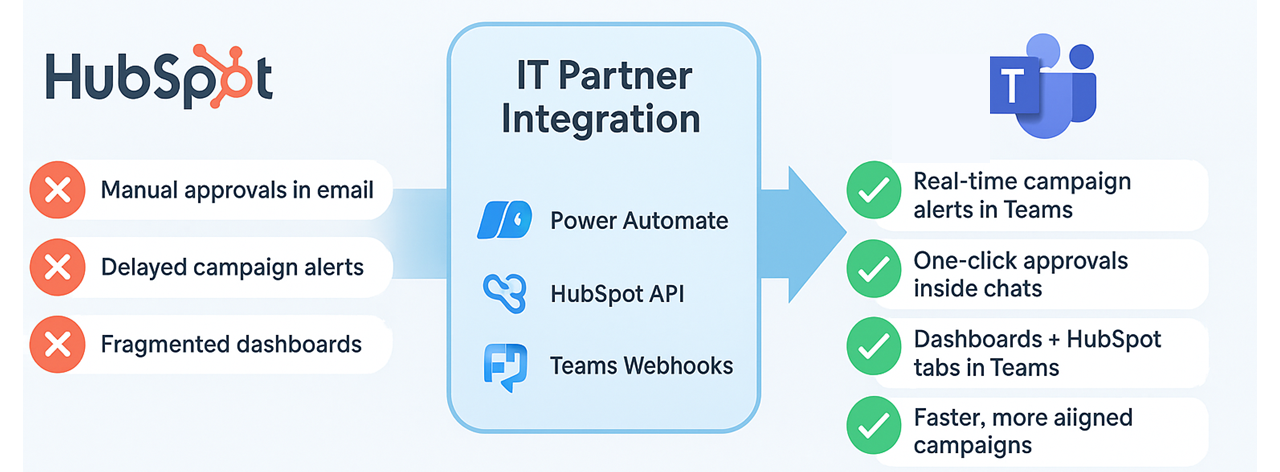
💡 Why It Matters
Without integration:
- Teams waste time switching between collaboration and CRM tools
- Campaign approvals get delayed in email chains
- Real-time campaign visibility is limited
With integration:
- ✅ Real-time campaign visibility in Teams channels
- ✅ One-click approvals that update HubSpot instantly
- ✅ Reduced app-switching with embedded marketing data
- ✅ Faster decision-making with immediate team collaboration
🚀 Key Benefits
- Faster campaign execution with reduced response times
- Centralized collaboration with HubSpot context in Teams
- Secure approvals using Azure AD permissions
- Customizable alerts for goal achievements and performance changes
- Improved cross-team alignment between departments
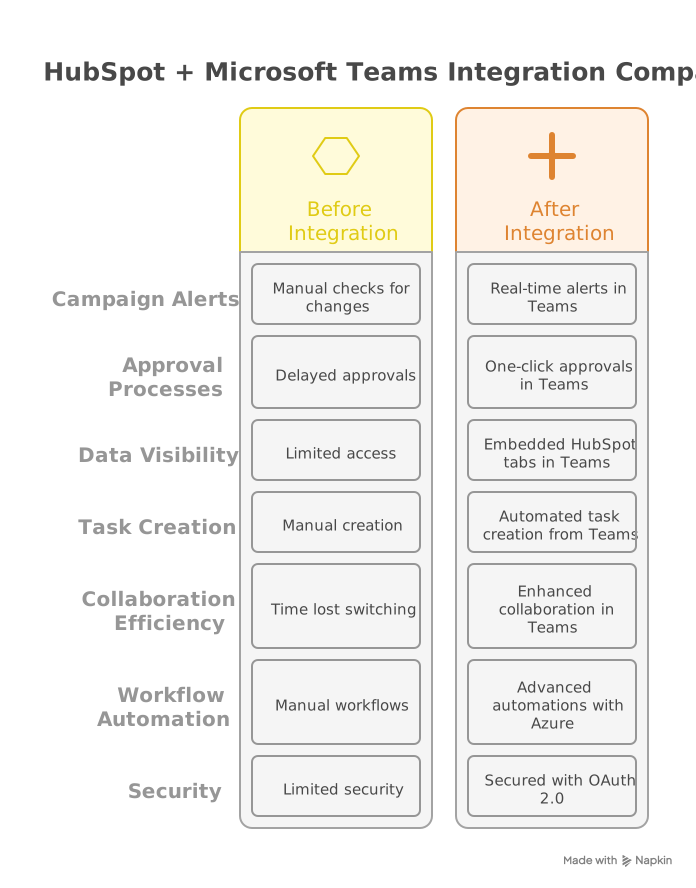
⚙️ How It Works
Build Power Automate flows using:
- HubSpot REST API for campaign updates
- Teams webhooks for real-time notifications
- Azure Logic Apps for workflow automation
Embed HubSpot tabs in Teams channels for:
- Campaign performance dashboards
- Contact lists and engagement metrics
- Marketing analytics and reports
Set up approval workflows:
- Teams message → HubSpot record updates
- Content approval processes
- Budget authorization workflows
Technical Notes:
- Uses HubSpot Webhooks for real-time event notifications
- Requires Power Automate Premium for custom connectors
- Supports HubSpot Marketing Hub Enterprise features
- OAuth 2.0 authentication for secure API connections
🎯 Who's This For?
- Marketing teams using HubSpot and Teams daily
- Marketing operations needing real-time performance visibility
- Content teams requiring streamlined approval processes
- Marketing managers overseeing budget and campaign approvals
- Agencies managing multiple client campaigns

🏆 Why Choose IT Partner
- HubSpot Certified Experts with deep integration experience
- Pre-built templates for common marketing workflows
- End-to-end security with Azure AD integration
- Marketing technology specialists with platform knowledge
- 24/7 support and ongoing optimization services

💬 What's Next?
Let's connect your marketing and collaboration tools for better campaign execution:
Transform your marketing collaboration with seamless HubSpot and Teams integration.
概要
https://store-images.s-microsoft.com/image/apps.28883.f61fd138-a317-4a15-aab6-a24ea519b302.cf492e3a-5fad-40f9-b63c-b929d8cd5f3e.c2b3108a-37b7-4385-94f9-c5a4914e341e
IT Partner LLC が提供するその他のコンサルティング サービス
Copilot for Microsoft 365 Optimization Assessment: 1-Hour Consulting ServiceIT Partner LLCEmpower digital transformation journey with Microsoft Copilot Optimization Assessment to elevate productivity, streamline workflows, and maximize AI utilization for impactful business growth.
+3
Applicable to: Adoption & Change Management
 Knowledge & Insights
 Workplace Analytics
Adoption & Change ManagementKnowledge & InsightsWorkplace AnalyticsNaN out of 5
Full Cutover Google Workspace to Office 365 migration: 7-Days Professional ServiceIT Partner LLCMigrate G Suite (Google Apps) to Microsoft 365, transferring mailboxes, calendars, tasks, contacts, files, and documents seamlessly to Exchange Online and OneDrive.
+3
Applicable to:Adoption & Change Management Identity & Access Management
 Mobile Device Management
Adoption & Change ManagementIdentity & Access ManagementMobile Device ManagementNaN out of 5
Chief Information Officer (CIO) as a Service: 1-Day Consulting ServiceIT Partner LLCProvide organizations with strategic technology leadership and guidance, ensuring effective utilization of IT resources and alignment with business objectives.
+3
Applicable to:Adoption & Change ManagementKnowledge & InsightsWorkplace Analytics
Adoption & Change ManagementKnowledge & InsightsWorkplace AnalyticsNaN out of 5
Microsoft Teams Phone System - Initial Setup: 2-Wk Professional ServiceIT Partner LLCWe will help you deploy, configure, and set up the Cloud Phone System & Enterprise Voice in Microsoft 365.
+3
Applicable to:Adoption & Change Management Calling for Microsoft Teams
 Device Deployment & Management
Adoption & Change ManagementCalling for Microsoft TeamsDevice Deployment & ManagementNaN out of 5
Office 365 Administrator On DemandIT Partner LLCAssistance with various admin tasks, such as user creation and Exchange Online rule management in your Microsoft 365 account is available via phone, Skype for Business, or remotely.
+3
Applicable to:Adoption & Change ManagementKnowledge & InsightsWorkplace Analytics
Adoption & Change ManagementKnowledge & InsightsWorkplace AnalyticsNaN out of 5