

https://catalogartifact.azureedge.net/publicartifacts/itpartner365-4100178.hubspot_microsoft_teams_nt-d09b26d8-12cd-49e3-b52f-52f551962ba1/c3d6f75b-a82a-48f7-8f16-2524b4db8fce_ITPlogoprev350px.png
HubSpot and Microsoft Teams Integration
IT Partner LLC
Just a moment, logging you in...
Integrate HubSpot with Microsoft Teams to receive real-time campaign alerts, approve marketing content, and collaborate with embedded CRM data directly in Teams.
Integrate HubSpot with Microsoft Teams to receive real-time campaign alerts, approve marketing content, and collaborate with embedded CRM data directly in Teams.
💬 HubSpot + Microsoft Teams Integration
Accelerate campaigns and streamline marketing approvals — right in Teams.
Switching between HubSpot and Teams delays responses and creates visibility gaps for marketing teams.
With our HubSpot + Microsoft Teams Integration, your team can:
- Get real-time campaign alerts in Teams channels when key metrics change
- Approve marketing content and budgets directly from Teams messages
- Collaborate on campaigns with HubSpot data embedded in Teams chats
🔗 What This Integration Does
We connect Microsoft Teams with HubSpot to enable:
- Automated campaign alerts in Teams channels
- Approval workflows triggered from Teams that update HubSpot records
- Teams tabs with HubSpot data (Campaigns, Contacts, Performance dashboards)
- @mentions in Teams that create HubSpot tasks and follow-ups
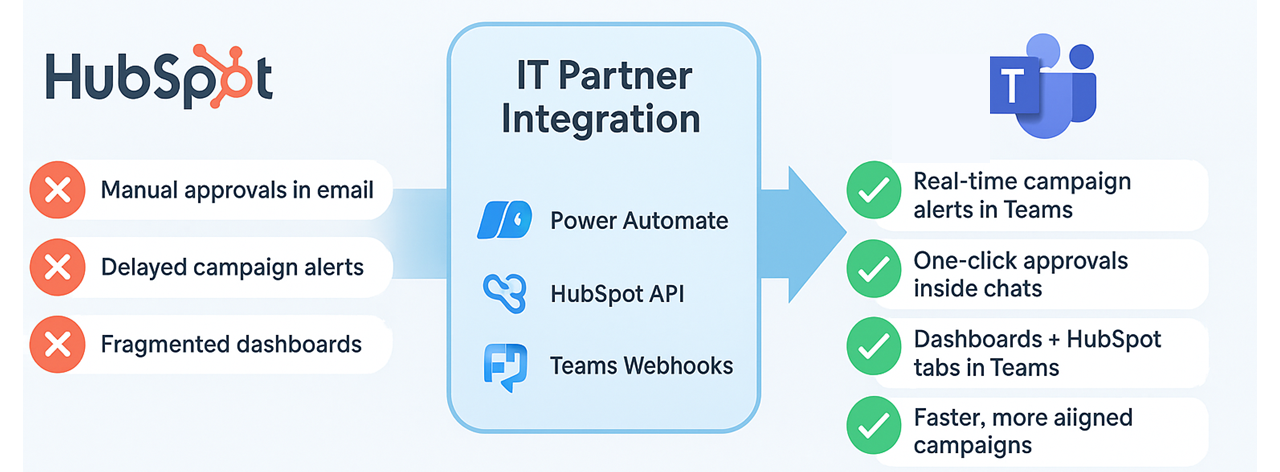
💡 Why It Matters
Without integration:
- Teams waste time switching between collaboration and CRM tools
- Campaign approvals get delayed in email chains
- Real-time campaign visibility is limited
With integration:
- ✅ Real-time campaign visibility in Teams channels
- ✅ One-click approvals that update HubSpot instantly
- ✅ Reduced app-switching with embedded marketing data
- ✅ Faster decision-making with immediate team collaboration
🚀 Key Benefits
- Faster campaign execution with reduced response times
- Centralized collaboration with HubSpot context in Teams
- Secure approvals using Azure AD permissions
- Customizable alerts for goal achievements and performance changes
- Improved cross-team alignment between departments
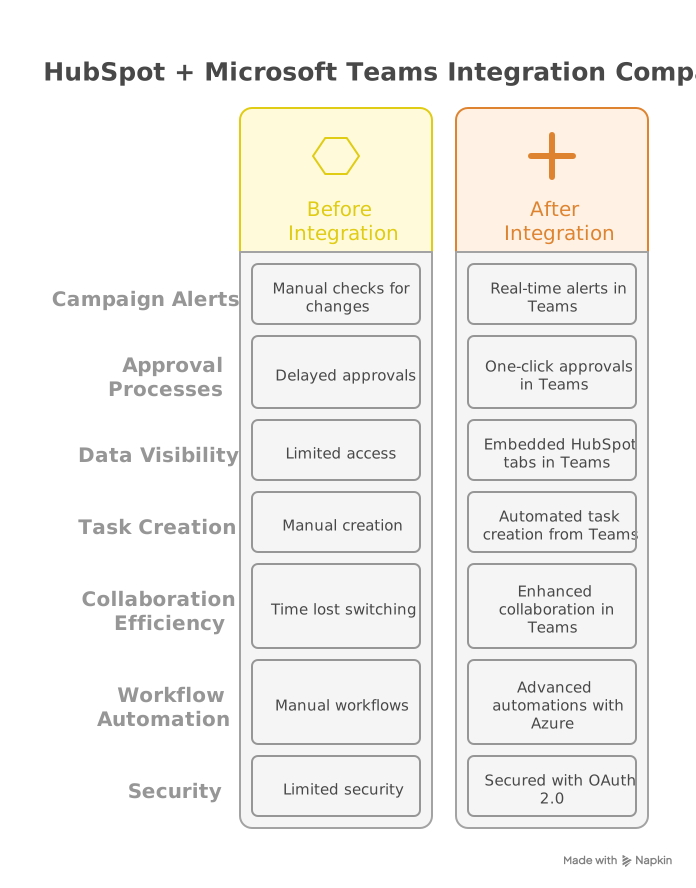
⚙️ How It Works
Build Power Automate flows using:
- HubSpot REST API for campaign updates
- Teams webhooks for real-time notifications
- Azure Logic Apps for workflow automation
Embed HubSpot tabs in Teams channels for:
- Campaign performance dashboards
- Contact lists and engagement metrics
- Marketing analytics and reports
Set up approval workflows:
- Teams message → HubSpot record updates
- Content approval processes
- Budget authorization workflows
Technical Notes:
- Uses HubSpot Webhooks for real-time event notifications
- Requires Power Automate Premium for custom connectors
- Supports HubSpot Marketing Hub Enterprise features
- OAuth 2.0 authentication for secure API connections
🎯 Who's This For?
- Marketing teams using HubSpot and Teams daily
- Marketing operations needing real-time performance visibility
- Content teams requiring streamlined approval processes
- Marketing managers overseeing budget and campaign approvals
- Agencies managing multiple client campaigns

🏆 Why Choose IT Partner
- HubSpot Certified Experts with deep integration experience
- Pre-built templates for common marketing workflows
- End-to-end security with Azure AD integration
- Marketing technology specialists with platform knowledge
- 24/7 support and ongoing optimization services

💬 What's Next?
Let's connect your marketing and collaboration tools for better campaign execution:
Transform your marketing collaboration with seamless HubSpot and Teams integration.
At a glance
https://catalogartifact.azureedge.net/publicartifacts/itpartner365-4100178.hubspot_microsoft_teams_nt-d09b26d8-12cd-49e3-b52f-52f551962ba1/0392ab03-5513-4e64-9c86-8acd3ef76f4e_WhyITPartner.png