Just a moment, logging you in...
https://catalogartifact.azureedge.net/publicartifacts/itpartner365-4100178.hubspot_microsoft_power_bi_nt-4c7f6e17-9fc1-43db-9763-9b99cdfd63fb/e39c7e7c-1b73-4b20-984d-b9171baa7303_ITPlogoprev350px.png
HubSpot and Microsoft Power BI Integration
IT Partner LLC
Automatically sync HubSpot with Power BI to create real-time marketing dashboards, track campaign performance, and measure ROI with automated data refreshes.
Automatically sync HubSpot with Power BI to create real-time marketing dashboards, track campaign performance, and measure ROI with automated data refreshes.
📊 Connect HubSpot with Microsoft Power BI
Automate marketing reporting and unlock real-time campaign insights.
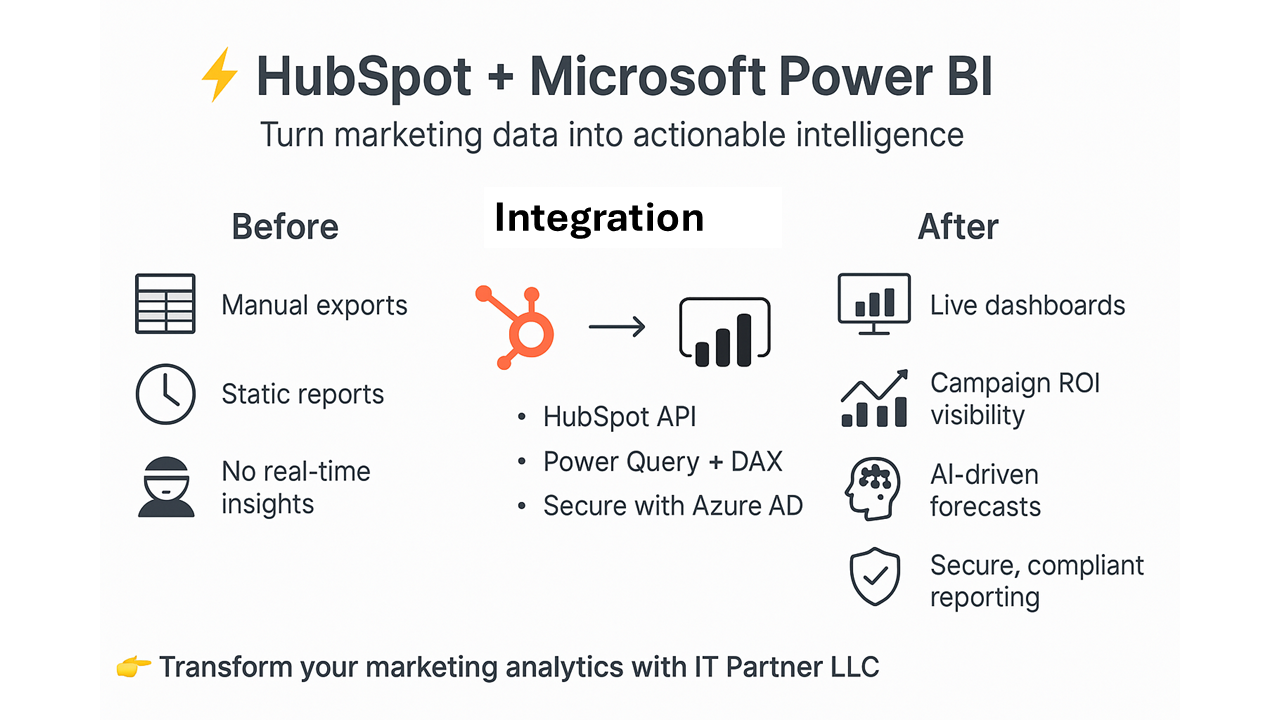
Manual data exports from HubSpot delay decision-making and obscure critical marketing trends.
With our HubSpot + Power BI Integration, your team can:
- Sync HubSpot data automatically to Power BI via API
- Visualize real-time marketing KPIs like campaign performance and lead conversion
- Track marketing ROI with unified dashboards for campaigns and channels
- Forecast accurately using AI-driven models fed by live HubSpot data
🔗 What This Integration Does
We connect Power BI with HubSpot to enable:
- Hourly or real-time data refreshes using HubSpot REST API
- Pre-built marketing dashboards for campaigns, contacts, and deals
- Custom DAX measures for advanced analytics like CAC and LTV
- Row-level security via Azure AD to control data access
- OAuth 2.0 authentication for secure API connections
💡 Why It Matters
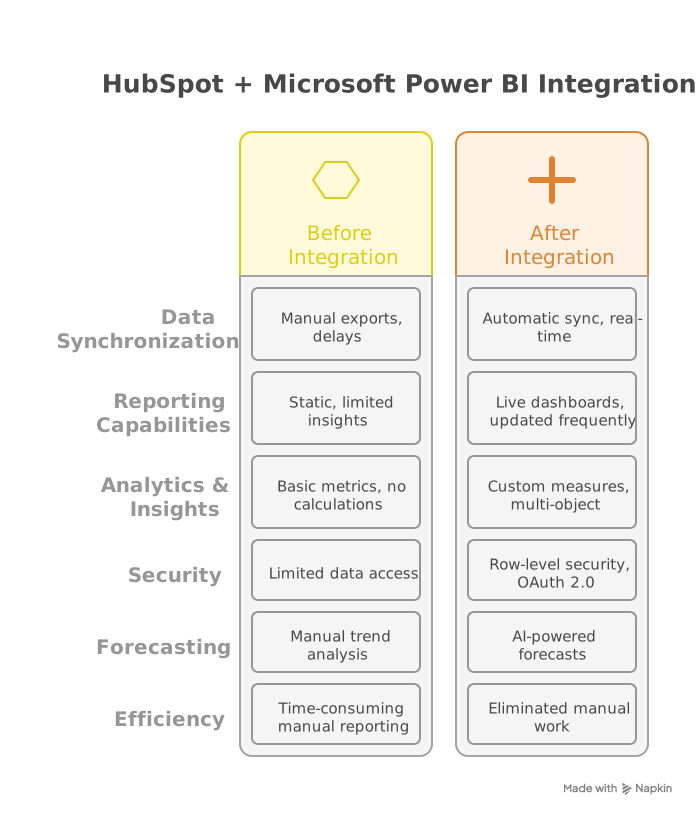
Without integration:
- Teams rely on static HubSpot reports with limited insights
- Leadership lacks real-time visibility into campaign performance
- Teams can't measure marketing impact on revenue effectively
With integration:
- ✅ Live marketing dashboards updated hourly
- ✅ 360° customer journey views combining data sources
- ✅ AI-powered forecasts using machine learning
- ✅ Unified reporting across all marketing channels
🚀 Key Benefits
- Eliminate manual reporting – Automate HubSpot data pulls
- Optimize marketing spend – Visualize channel performance in real-time
- Secure sensitive data using Azure AD and row-level security
- Scale with Power BI Premium for large datasets
- Measure campaign effectiveness by connecting activities to revenue
⚙️ How It Works
- Authenticate securely with HubSpot API using OAuth 2.0
- Extract data via Power Query (Contacts, Companies, Deals, Campaigns)
- Transform and model data with Common Data Model
- Build interactive reports with drill-through capabilities
- Automate refreshes via Power BI Gateway
Requirements:
- HubSpot API access (Professional Edition or higher)
- Power BI Pro for scheduled reports
- Azure AD for secure authentication
⚠️ Limitations:
- Read-only – Cannot write back to HubSpot
- API call limits apply based on HubSpot tier
- Complex data models may require Power BI Premium
🎯 Who's This For?
- Marketing teams needing real-time campaign visibility
- Marketing operations managing performance reporting
- Growth leaders measuring marketing attribution and ROI
- Executives tracking marketing performance
- Agencies managing multiple client accounts

🏆 Why Choose IT Partner LLC
- HubSpot integration specialists with certification
- Pre-built accelerator templates for marketing KPIs
- End-to-end support from scoping to training
- Proven methodology for marketing data and analytics
- Marketing technology experts with workflow understanding

💬 What's Next?
Transform your HubSpot data into actionable marketing intelligence with Power BI.
Transform your marketing analytics with powerful HubSpot and Power BI integration.
At a glance
https://catalogartifact.azureedge.net/publicartifacts/itpartner365-4100178.hubspot_microsoft_power_bi_nt-4c7f6e17-9fc1-43db-9763-9b99cdfd63fb/af8b5a3c-c53e-47bd-a93a-dfad63cecc4f_WhyITPartner.png
Other consulting services from IT Partner LLC
Full Cutover Google Workspace to Office 365 migration: 7-Days Professional ServiceIT Partner LLCMigrate G Suite (Google Apps) to Microsoft 365, transferring mailboxes, calendars, tasks, contacts, files, and documents seamlessly to Exchange Online and OneDrive.
+3
Applicable to: Adoption & Change Management
 Identity & Access Management
 Mobile Device Management
Adoption & Change ManagementIdentity & Access ManagementMobile Device ManagementNaN out of 5
Office 365 Administrator On DemandIT Partner LLCAssistance with various admin tasks, such as user creation and Exchange Online rule management in your Microsoft 365 account is available via phone, Skype for Business, or remotely.
+3
Applicable to:Adoption & Change Management Knowledge & Insights
 Workplace Analytics
Adoption & Change ManagementKnowledge & InsightsWorkplace AnalyticsNaN out of 5
Copilot for Microsoft 365 Optimization Assessment: 1-Hour Consulting ServiceIT Partner LLCEmpower digital transformation journey with Microsoft Copilot Optimization Assessment to elevate productivity, streamline workflows, and maximize AI utilization for impactful business growth.
+3
Applicable to:Adoption & Change ManagementKnowledge & InsightsWorkplace Analytics
Adoption & Change ManagementKnowledge & InsightsWorkplace AnalyticsNaN out of 5
Microsoft Volume LicensingIT Partner LLCGet help buying Microsoft Volume Licensing. Our consultants will find the best solution for your needs, whether you're a student or a business needing managed services, all at the best price.
+3
Applicable to:Adoption & Change ManagementKnowledge & InsightsWorkplace Analytics
Adoption & Change ManagementKnowledge & InsightsWorkplace AnalyticsNaN out of 5
Chief Information Officer (CIO) as a Service: 1-Day Consulting ServiceIT Partner LLCProvide organizations with strategic technology leadership and guidance, ensuring effective utilization of IT resources and alignment with business objectives.
+3
Applicable to:Adoption & Change ManagementKnowledge & InsightsWorkplace Analytics
Adoption & Change ManagementKnowledge & InsightsWorkplace AnalyticsNaN out of 5